

Product Design - Design Systems - FinTech Marketplace
Beacon Auto:
Marketplace Design System
Executive Summary
Some client names and branding have been changed to protect confidentiality.
I served as the UI designer and brand liaison for Beacon Auto Finance, a white-labeled auto shopping marketplace embedded within the broader Beacon platform. My role was to bridge Beacon’s existing brand standards with the technical realities of a new platform build, translating stakeholder requirements into a cohesive, on-brand digital experience. The result was a fully launched marketplace serving Beacon customers across a network of ~4,500–5,000 partner dealers and approximately 1 million vehicles. This engagement was part of a broader set of white-label platform partnerships that collectively generated ~$1.2M in implementation fees and ~$2.9M in annual recurring revenue.
The Challenge
Beacon's customers already trusted the brand across a wide range of banking and financial services, but had no native car shopping experience to speak of. If a Beacon customer wanted to finance a vehicle, they had to go elsewhere, stepping outside the Beacon ecosystem entirely to browse inventory and then return to complete financing. This fragmentation meant Beacon was missing a significant opportunity to serve customers at one of the most financially meaningful moments in their lives.
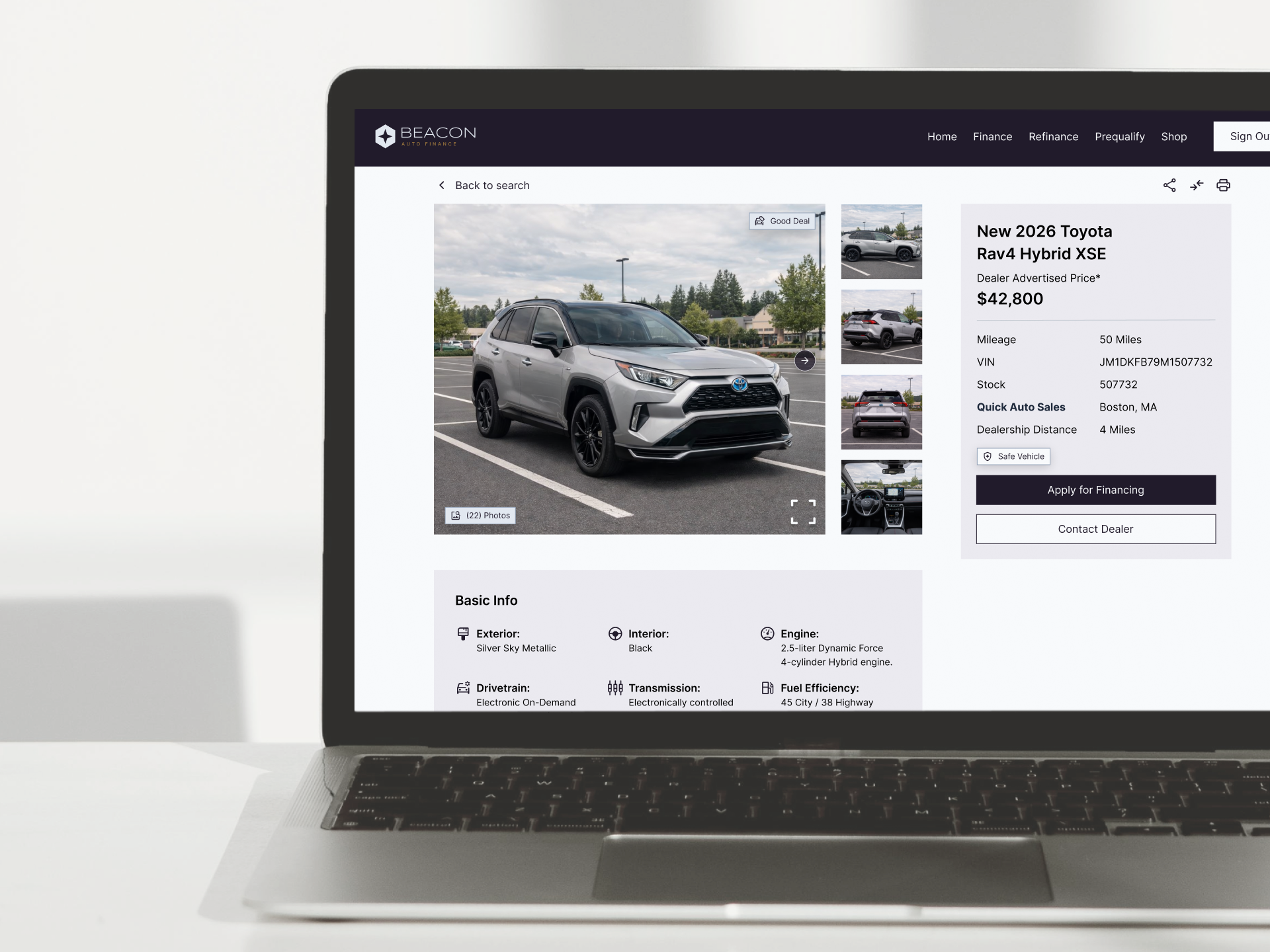
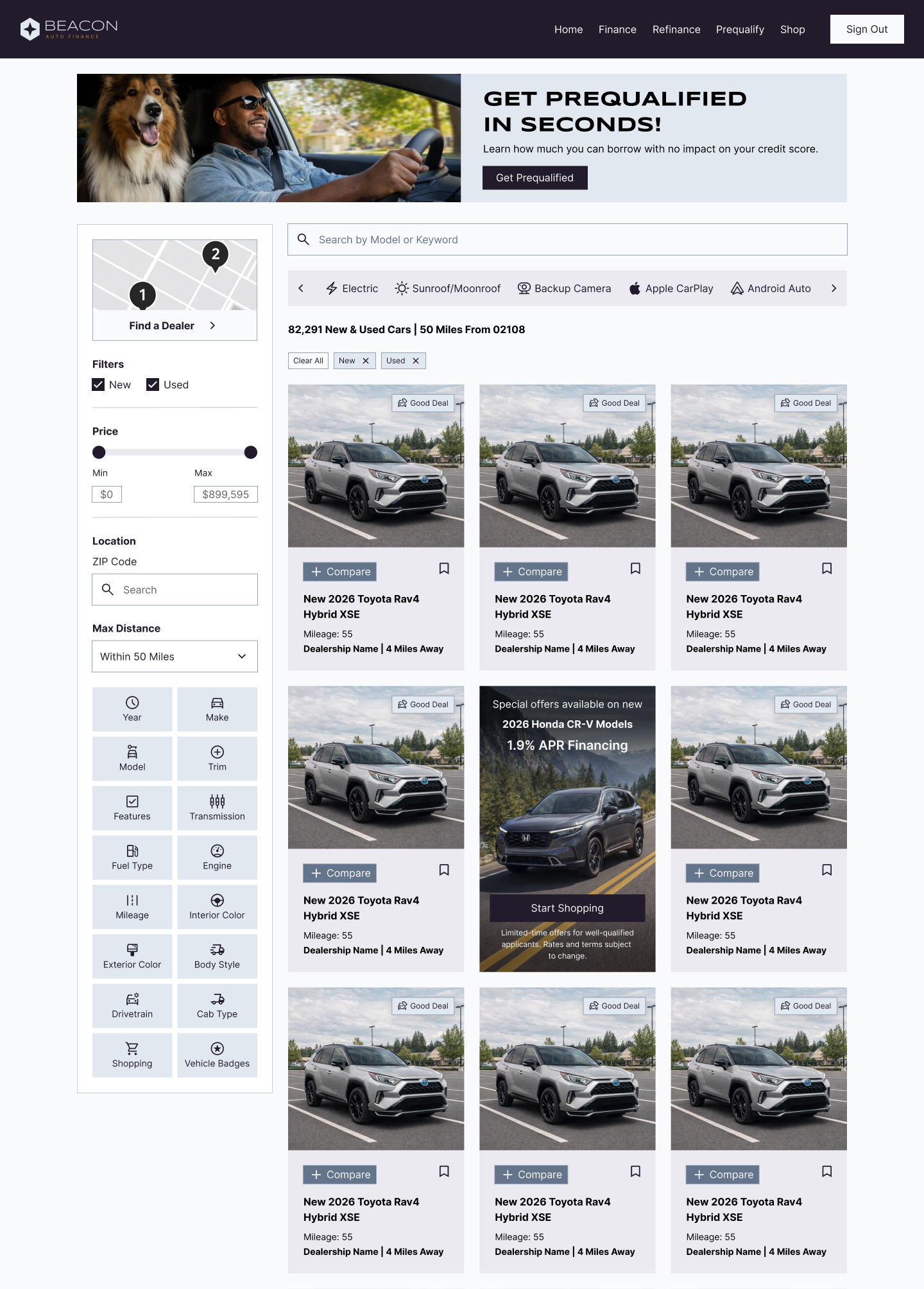
The challenge wasn't fixing a broken experience. It was building one from scratch, and doing so in a way that felt native to Beacon's brand rather than like a third-party tool bolted on. For my role specifically, that meant taking brand standards that had never been applied to a marketplace context and making judgment calls at every level of the UI, from inventory cards and search filters down to personalized financing nudges and authenticated user flows.
The Solution
My work focused on three core areas: brand translation, component-level UI design, and stakeholder alignment.
Brand Translation
Beacon's brand standards were built for traditional financial product contexts. My job was to interpret and extend those standards for a marketplace environment, defining how their color palette, typography, and visual language should apply to inventory cards, search filters, dealer pages, and financing nudges. It wasn't a one-to-one lift; it required judgment calls at every level.
Component-Level UI Design
The platform's architecture was component-based, which meant design decisions had downstream implications across dozens of UI states. I designed within that system intentionally, ensuring that Beacon-specific styling was applied consistently across vehicle results pages (VRP), vehicle detail pages (VDP), prequalification flows, and authenticated user experiences. One of the standout features of the build was a Save and Compare tool, presented as a flyout drawer, that allowed shoppers to compare vehicle specs and pricing side by side. The feature was designed to work for both signed-in and guest users, with guest users able to compare vehicles freely but prompted to create a Beacon account to save vehicles to their profile. Designing for both states thoughtfully, without creating a jarring or frustrating experience for unauthenticated users, was a key UX challenge and a priority for both our team and Beacon stakeholders.
Stakeholder Alignment
I participated directly in conversations with Beacon stakeholders throughout the project, helping them understand both what was possible within the platform and what would best serve their brand. This kept design decisions grounded in both technical feasibility and brand intent, and reduced revision cycles by keeping all parties aligned early.
Asset Detail Page
A comprehensive campaign view featuring selectable variants, performance stats (views, downloads, ratings), and detailed metadata by brand, season, and theme. Users can preview assets, explore related content, and request downloads all in one streamlined interface.

Challenges & Solutions
Challenges
Learning to effectively communicate design intent through AI prompts for a complex asset gallery interface.
Navigating the limitations and capabilities of Figma Make for rapid prototyping.
Balancing AI-generated solutions with intentional design decisions.
Solutions
Developed an iterative prompting strategy to guide AI toward desired design outcomes.
Leveraged AI's ability to generate comprehensive content frameworks while maintaining design control through strategic "nudging".
Created multiple prompt variations to explore different approaches to asset organization and user flow.
Outcome & Reflection
Outcome
Successfully created a functional asset gallery prototype through AI-assisted design, demonstrating the potential for rapid concept development.
Established a workflow for prompt-based design iteration that could be applied to future projects.
Reflection
This project highlighted the importance of prompt crafting as a new design skill - being specific about constraints while leaving room for AI creativity.
The iterative "conversation" with AI revealed unexpected design solutions I might not have considered in traditional design processes.
Technical limitations (SVG uploads, prompt failures) taught me to work within tool constraints while maintaining design quality.
The experience showed AI's strength in generating comprehensive frameworks quickly, but reinforced the need for human design judgment in refinement.